
Motley CMS
The content management system we build websites on. We wrote it, we maintain it, and this site runs on it.
Motley CMS
Motley CMS is the content management system we build websites on. We wrote it, we maintain it, and it runs this site along with many of the sites we look after for clients.
Most content management systems get their features from plugins. A page builder from one company, contact forms from another, security from a third, each on its own update schedule and its own renewal date. Motley CMS does that work itself, as one product. Almost everything else on this page follows from that.
Security first
This is the part we spend the most time on, and it shapes the rest of the product.
Failed logins are throttled and accounts lock on their own, with an email and a dashboard warning the moment a pattern appears. The whole admin can be restricted to a list of trusted addresses. The sign-in page can be moved off the obvious address, so the bots that hammer it find nothing there. Rich text is cleaned against a strict allow-list when it's saved, uploads are checked by their real file type rather than their name, and permission checks run on the server rather than in the interface.
The part that matters at nine on a Friday evening is the response. Blocking an attacking address, signing a compromised account out of every device, tightening the lockout rules, or taking the public site offline cleanly are all buttons in the admin. No SSH, no developer, no hosting ticket. There's a written playbook built in that walks a non-technical admin through each situation a step at a time.
Where the claims stop. Large traffic floods are handled at the network edge rather than inside the application, and the built-in playbook says so. Our security reviews are recorded engineering work, repeated on a regular basis rather than done once at launch, and they aren't an independent penetration test. Where a project needs one of those, we arrange it.
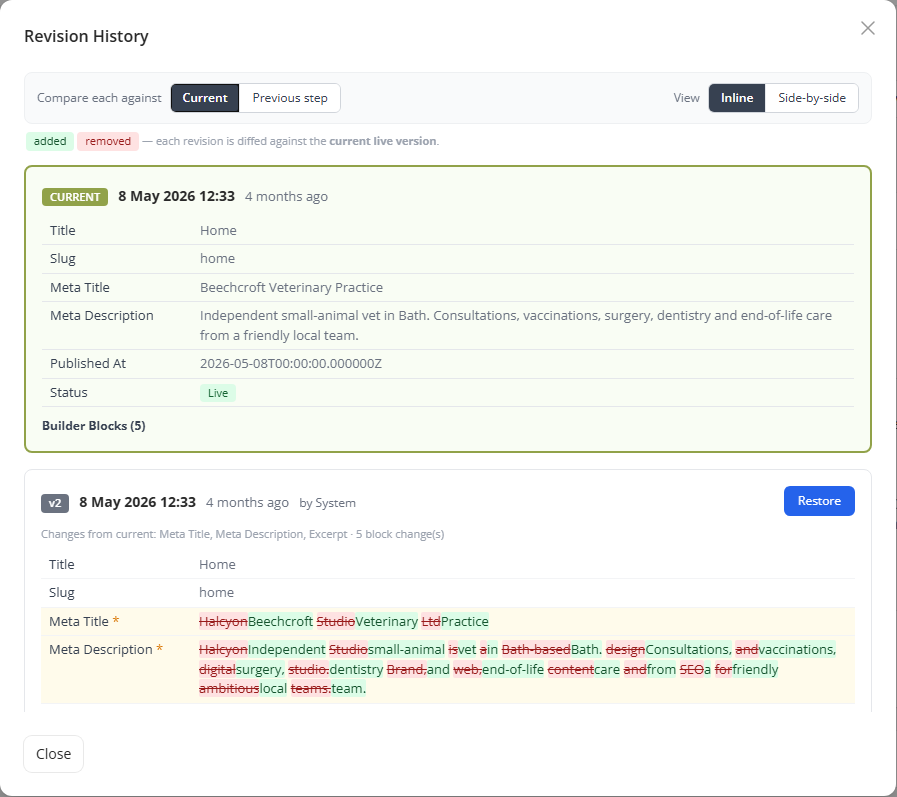
Every edit keeps its history. This is the revision history for one page: each older version is compared with the live one word by word (red is what went, green is what came in), with a Restore button beside it. So a bad edit on a Friday afternoon takes a couple of clicks to put back.
Made for whoever updates the site
A content management system is only as good as the Tuesday afternoon when someone needs to change the opening hours.
Pages are assembled from blocks: text, images, columns, calls to action, pricing tables, galleries, forms, maps, video. There are more than thirty, though nobody meets them all on day one. A site starts in a simple mode that offers just the everyday ones and unlocks the rest when the person running it wants them. That's one setting, not a rebuild.
Whole sections switch on and off. Turn the blog off and it disappears from the navigation, the web address and the listing page, and it’s all still there when you turn it back on. Rename “Blog” to “Articles” and the menu, the page title, the breadcrumb and the address all follow.
The rest is the everyday furniture, built in rather than bought in: a media library that tells you where a file is used before you delete it, a form builder that keeps its submissions in the admin, navigation and redirects, site search, scheduled publishing, a cookie consent banner, scheduled backups, visitor numbers and search queries on the dashboard, and a shop for the sites that need one.
An AI writing assistant sits in the admin as well. It runs on your own key and stays off until you add one, so nobody pays for it by default.
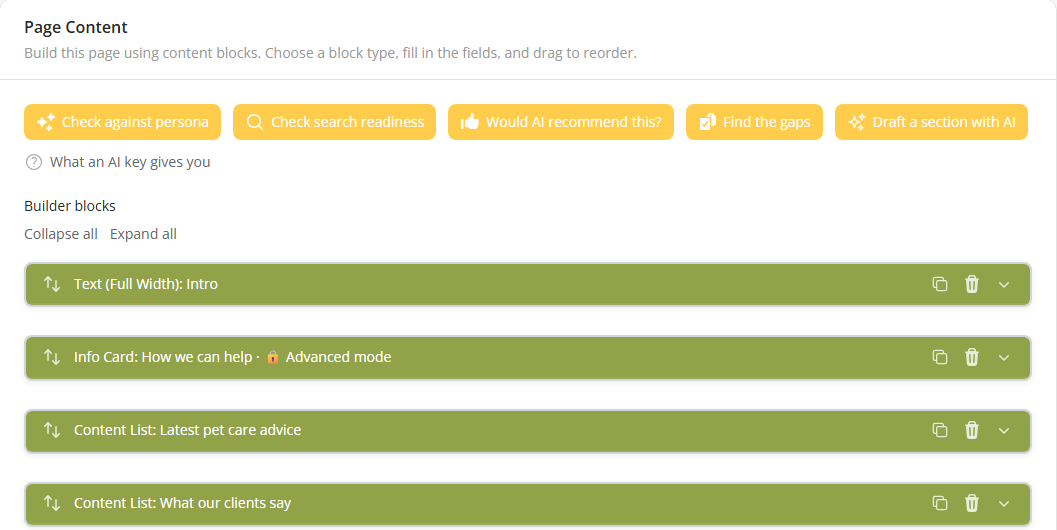
This is a page open in the editor. Each green bar is one block (open it to change the words, drag it to move it). The buttons along the top are the AI helpers. They run on the site's own key, so they stay off until one is added.
The thing that struck me more than anything is the intuitive usability of the CMS. Clear explanations on editable fields, and helpful tips make such a difference, and show just how geared you are towards your users... Love the Resources documents - written in plain English, with examples, for real people, not geeks.
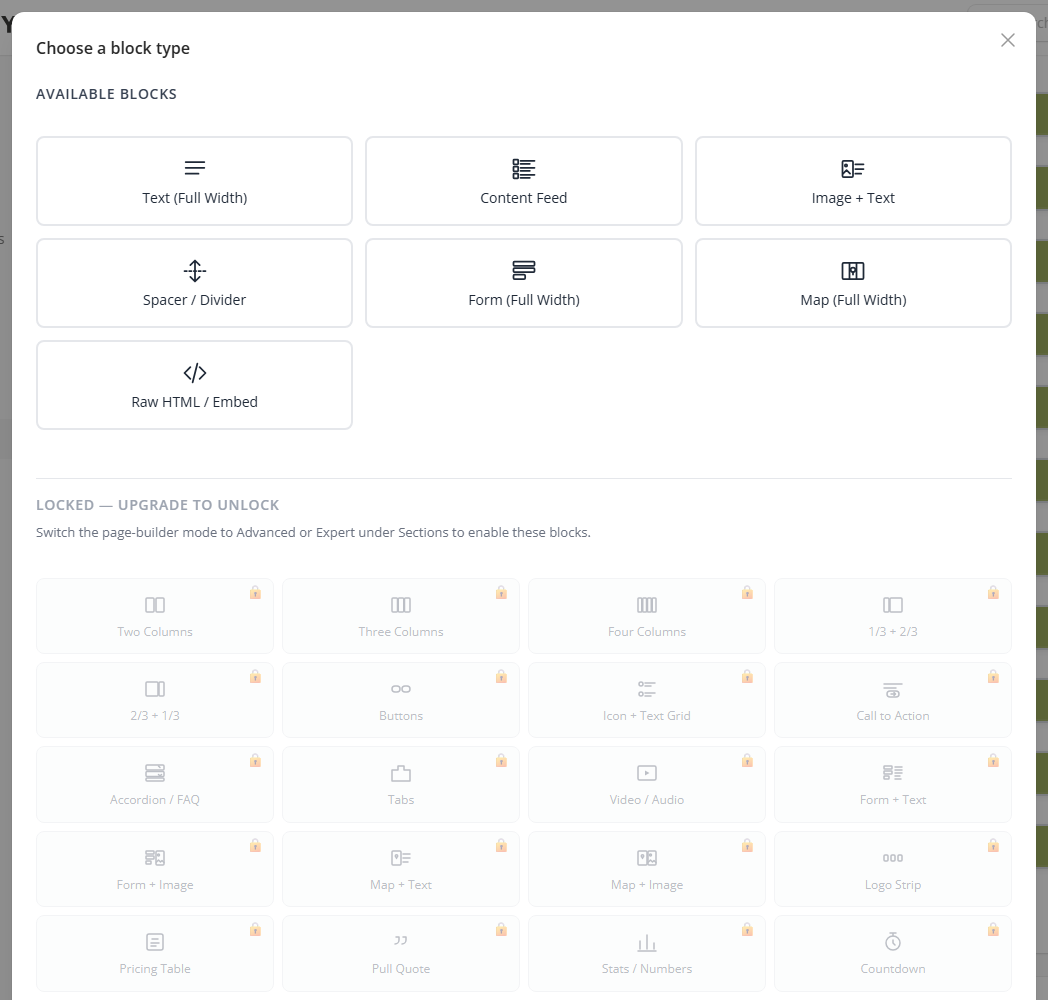
This is the block picker, the screen an editor sees when they add something to a page. The tiles at the top are what a new site starts with. The greyed-out ones below unlock when the mode changes, which is one setting rather than a rebuild.
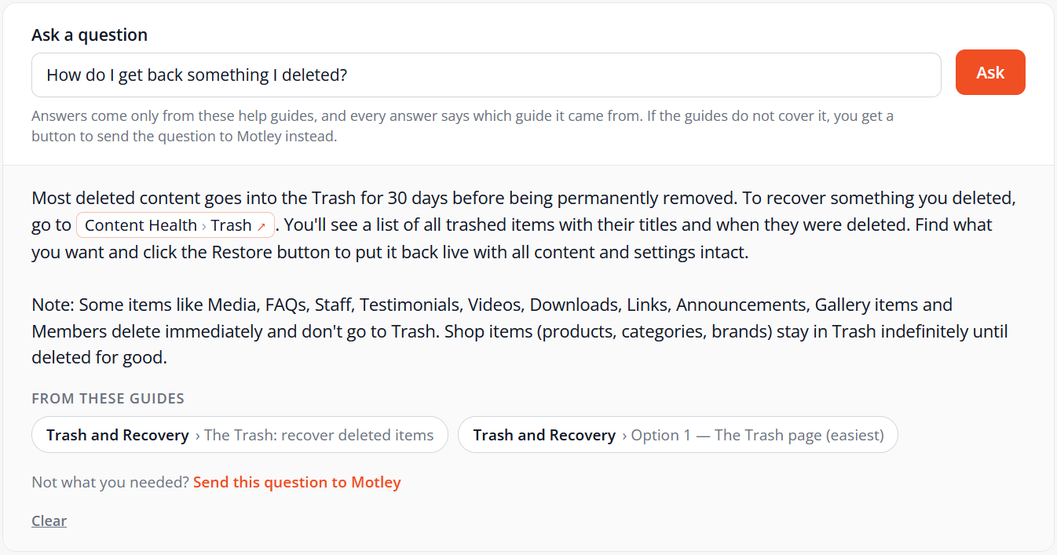
This is the help page in the admin. Ask a question in your own words and the answer comes from the site's own guides, with the guide it came from named underneath. If the guides don't cover it, there's a button to send the question to us instead.
Sections you switch on
Blocks build a page. Sections are the bigger structures: a news feed, an events diary, a team page, a shop. Each one is a switch. Turn it on and you get the admin screens, the listing page, the web address and the navigation entry together. Turn it off and all of it leaves the site, with the content still sitting there for whenever you want it back.
Most sites use a handful. The rest stay out of the way.
Publish
- Pages
- Blog or articles
- News
- Events
- Landing pages
- Announcements
Show your work
- Case studies
- Services
- Staff
- Testimonials
- Gallery
- Videos
Everyday tools
- Forms
- FAQs
- Downloads
- Links
- Members area
- Shop
Being found by AI, not just Google
More people now ask ChatGPT, Copilot or Perplexity instead of searching. Most websites are invisible to that, because the things those systems read are the things most sites never publish.
Motley CMS publishes them as standard. Your site carries a machine-readable guide to the business, including what you don't do, so an assistant can't invent services on your behalf. Every public page is also available as clean text an assistant can actually read. Question and answer sections are marked up so they can be quoted directly. Search engines can be told the moment something is published instead of waiting to be crawled.
You can also see whether any of it is working. One report shows which AI crawlers say they are reading the site. Another asks the assistants whether they name your business when someone describes what you do, and who they name instead. That one runs on your own key, so it stays off until you add one.
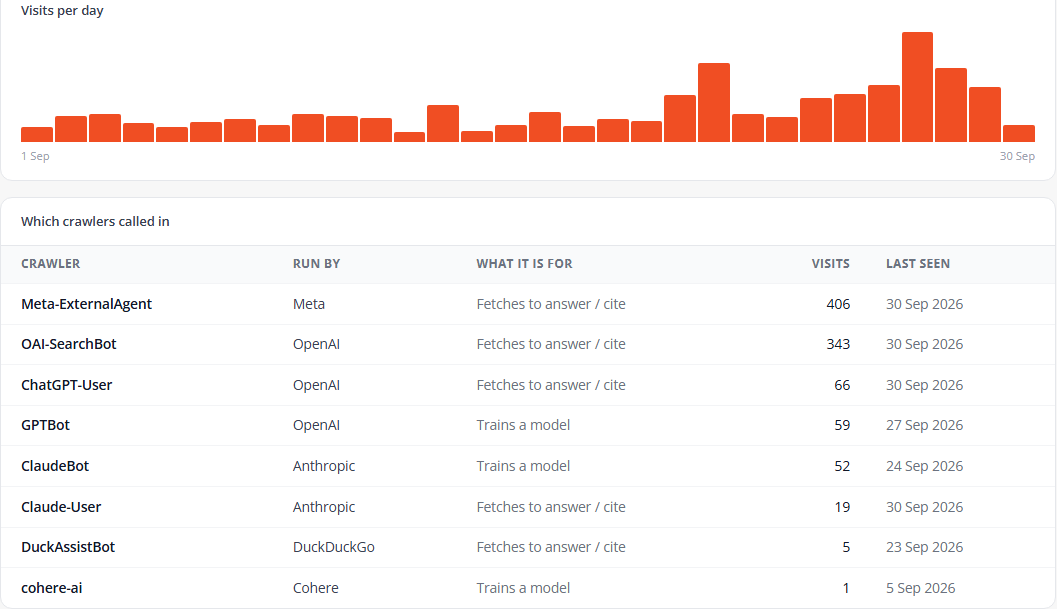
This is the AI crawler report, showing this site's own figures for September. It lists which AI companies' crawlers came to read the site, what each one is for (training a model, or fetching pages to answer someone's question) and how often it called. Ordinary visitor reports can't see these visits at all, because they rely on JavaScript and crawlers don't run it.
Where WordPress comes in
Most people asking for a website ask for WordPress, because it's the name they know. That's fair. What the name covers is the part that tends to surprise people.
A typical WordPress site is WordPress plus twenty-five to thirty-five separate plugins, handling the page builder, the forms, the SEO, the security, the caching, the cookie banner and the rest. A dozen or so of those are paid. To reach the standard Motley CMS starts at, the plugin licences alone come to somewhere around £950 to £1,300 a year, per site, every year the site is live. That spend buys nothing the site couldn't already do on day one.
The bigger cost arrives later. Plugins are the most common way WordPress sites get broken into. Two dozen of them updating on their own schedules is why so many sites need a monthly care plan, and why so many owners stop updating and let the site rot. Any paid plugin can be sold, repriced or abandoned, and when that happens it's your site with the problem.
We still build on WordPress. For a large or unusual online shop, hundreds of products, subscriptions, several currencies, WooCommerce is the more mature option and we'd tell you so. There are also more WordPress developers to hire, which matters to some people. We think our own CMS is the better answer for most business websites, and we'd rather argue the case than pretend we have no view. When it isn't the right answer for you, we'll say that too.
Questions people ask
Who owns the content?
You do. Everything exports whole, whenever you want it: the content as JSON and Markdown, form submissions as CSV, and every image and file alongside it. It's your material, and it leaves in formats anything can read.
Does it keep getting updated?
Continuously. Your content and your site's styling sit apart from the engine underneath, so a site takes improvements and security patches for as long as it's live without an update breaking the layout. That separation is deliberate. It's what stops a site reaching the state where nobody dares press update.
Can a designer work with it?
Yes. There's a Designer role that signs in straight to the styling tools and sees nothing else. Colours, fonts, spacing and corners are all editable against a live preview, nothing reaches the public site until it's published, and a palette designed in Figma can be imported rather than rebuilt by hand.
Is it accessible?
Our frontend components are developed against WCAG 2.2 Level AA requirements, and site-level conformance hasn't been verified. That wording is deliberate. A site's accessibility depends partly on the words, images and colours added after launch, so no platform can promise the finished site meets the standard.
What's built in: everything works by keyboard, moving content can be paused, forms make sense to a screen reader, and colour contrast is measured in code rather than judged by eye. For a site that needs verified conformance, independent testing with real screen readers is a short, defined piece of work with a dated record at the end.
Where is it hosted?
On hosting powered by 100% renewable energy, in UK and US data centres, running at a data centre efficiency rating of 1.12 against an industry norm of 1.2 or higher. There’s more detail on our green web hosting page.
Can I see it working?
Ask and we'll walk you round a live one. It's quicker than a video, and you can poke at the parts that matter to you rather than the parts we'd have chosen to show.
Can I use it for my own clients?
Yes, and it works as a conversation rather than a download. It isn't something you pick up from a marketplace and install: we set the install up, host it or hand it over depending on what suits you, and keep it patched from there. Tell us what you're building and we'll talk it through.
Thinking about a site built on it?
Tell us what you're trying to do and we'll tell you whether this is the right answer for it. Sometimes it isn't, and we'd rather say so early than late.
Get in touchSeriously useful emails for small businesses
Choose the emails that suit you:
- Once a month, we round up our latest articles on websites, SEO, practical AI and the day-to-day questions that come with running a small business.
- We also send Tools Worth Using: honest reviews of apps and practical ideas that could make running your business a little easier.
Choose one or both. You’ll receive no more than three emails in a month, and can change your choice or unsubscribe at any time.