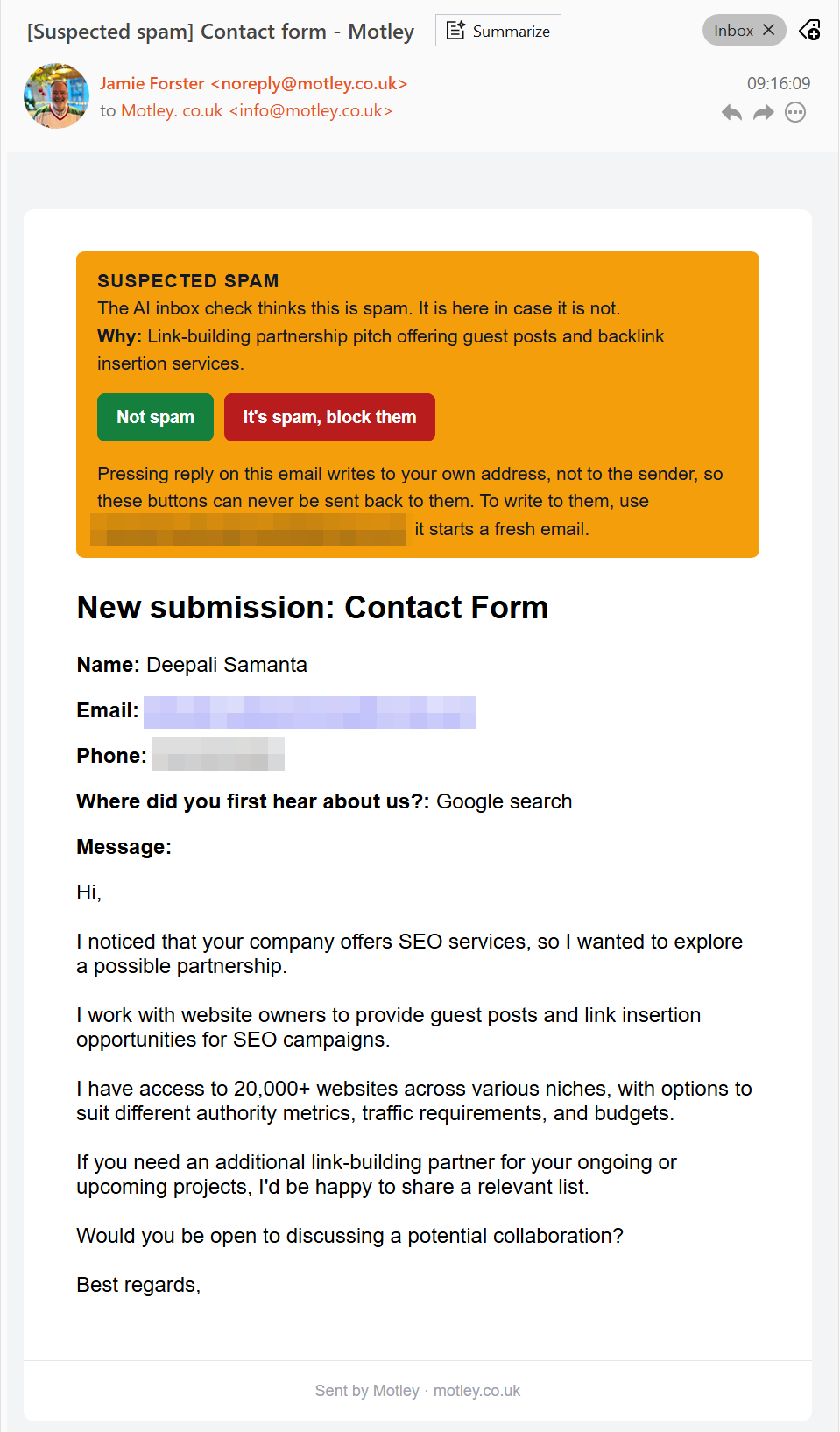
A message came through our contact form one Monday morning in November. The sender had "20,000+ websites" on their books and wanted to sell us guest posts and links. (They said they'd found us through Google search, which I'm choosing to take as a compliment.)
It's contact form spam, and you'll have had your own version of it. What caught my eye was what our website did with it. The email arrived with [Suspected spam] at the front of the subject line and a yellow bar across the top: "Why: Link-building partnership pitch offering guest posts and backlink insertion services." Under that sat two buttons, Not spam and It's spam, block them. I pressed the second one and got on with my morning.
So what does your website do with the same message?
Where does contact form spam go on your website?
On a lot of websites it goes into a spam folder in the admin area, and you're never told it arrived. Several of the big form tools and website builders work this way: no email is sent, and the message waits in a spam tab until it's deleted automatically, after 30 or 90 days depending on the platform.
That works while the filter is right. The trouble is the day it's wrong. A real customer who pastes in a link, writes in a hurry or writes from abroad gets judged as junk and goes into a folder you've never opened. They hear nothing back, assume you're not interested and ring the next business on their list. How would you ever know they wrote?
When I wrote about automation that fails without telling anyone, the point was that the silent failure costs the most. A spam folder you never check is that same failure, built into your website.
The other common approach is to let everything through and leave you to sort it. That loses nothing, but it trains you to skim your enquiries, and skimming is how a real one gets missed.
How our CMS handles it
Our CMS (the content management system, the part of the website you log into to run it) checks a message twice. The first catches software: invisible tests that turn away automated junk, with no puzzle for a real visitor to solve. It can't catch a person typing a sales pitch in by hand, because to every test a website can run, that person looks like a customer.
So the second check reads the words. An AI looks at each new message and decides whether it reads like a sales enquiry, a complaint, a job application or spam. When it thinks a message is spam:
You still get the email. Nothing is held back. The subject line says [Suspected spam], so you can skim past it or filter it, and the yellow bar gives the AI's reason in one line.
You can correct it from the email. Not spam puts that sender on a safe list, so they're never flagged again. It's spam, block them blocks that one address, and anything more from it is thrown away before it reaches you. Each one asks you to confirm on your own site first, because email security software clicks links to check them.
They don't get your thank-you email. Your automatic reply (one of the emails a website should send without you) only goes once the AI has read the message and doesn't think it's spam. So a spammer can't use your form to have your thank-you sent to somebody else's address. And if they ticked the box for your mailing list, they're kept off it until you decide.
If the AI is slow or unavailable, the email goes as normal. It's a guess, so it labels an enquiry and leaves the decision with you.
Is there a catch?
It's switched off until a site owner turns it on. The AI service (Anthropic or OpenAI, the companies behind Claude and ChatGPT) charges for each message it reads, paid to them directly, and the message is sent to that service to be read. That's a fair thing to weigh up before you hand software your customers' data, and I'd rather you chose it knowing both.
Questions to ask about your own forms
Whatever your website runs on, whoever looks after it should be able to answer these in a minute:
When the form thinks a message is spam, am I told it arrived?
Does it tell me why?
Can I put a wrong call right, and does the fix stick for that sender next time?
Does it read what the message says, or only check whether a robot sent it?
Does a suspected spammer still get my thank-you email?
If you only change one thing
Every spam filter gets it wrong now and then, so judge yours by what happens when it does. One that hides its mistakes can lose you a customer without you ever knowing. One that labels the message, says why and lets you correct it costs you a two-second glance. If the answer to the first question above is no, that's the one to change.
If you'd like to know what your own forms do with spam, or see how our CMS handles it, get in touch. If your current setup already does the job, I'll tell you so.
Seriously useful emails for small businesses
Choose the emails that suit you:
Once a month, we round up our latest articles on websites, SEO, practical AI and the day-to-day questions that come with running a small business.
We also send Tools Worth Using: honest reviews of apps and practical ideas that could make running your business a little easier.
Choose one or both. You’ll receive no more than three emails in a month, and can change your choice or unsubscribe at any time.
Google's AI picks the page that answers the question it was asked. What that means for a business website, from our own figures and from the client sites we look after, with the names left out.
If somebody tells you they built something in a week, ask what they were doing for the two years before that. AI made the first 80% fast. The last 20% is where software actually lives.
The point of automation is not to give yourself a new thing to watch. If yours needs babysitting, it has moved the work instead of removing it, and that is a fixable design problem.
We use cookiesWe use cookies to make this site work and to analyse how it's used. Choose below — you can change your mind any time.Read our cookie policy